Sharing & PDFs
How to Email a Seller Net Sheet to Your Client
Quick Answer
Calculate the net sheet first. Email sits in the row of buttons below the finished sheet, alongside Download PDF, Share Link, Print, and Edit Inputs.
Fill in the panel
Selecting Email opens a panel in place, headed Email Net Sheet to Client.
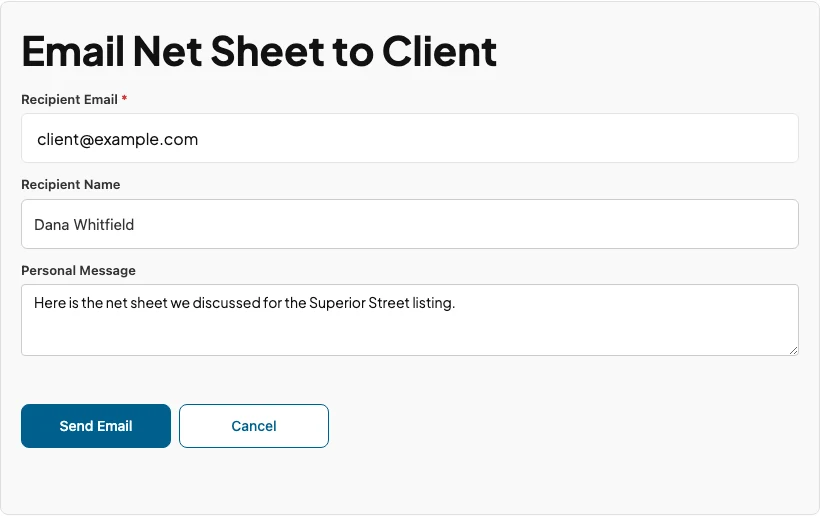
Recipient Email is the only required field.
Recipient Name sets the greeting. Supply it and the message opens Hi Dana; leave it blank and the greeting is just Hi.
Personal Message is inserted into the body under the standard line. Use it for the context that makes the figure make sense, the listing it belongs to or the scenario it assumes.
Select Send Email. The PDF is generated in your browser at that moment and attached to the message, so the attachment matches exactly what is on screen. Nothing is stored and re-sent later.
What the recipient gets
Subject line: Seller Net Sheet from your company name. The message is branded with your agency and carries the PDF as an attachment.
The body is short by design: the report title, the greeting, one line saying the estimate is attached, your personal message if you wrote one, and a closing note that the figures are an estimate.
Replies go to your agency’s email address. If you are signed in to the Partner Portal when you send, your name, phone, and email are added as a signature block and replies come to you instead.
Which tools offer Email
This is not the same on every tool.
| Tool | Email button |
|---|---|
| Seller Net Sheet | On the result, wherever the tool is published |
| Buyer Closing Cost Estimate | On the result, wherever the tool is published |
| Title Quote | Only on a branded partner link or inside the Partner Portal |
The Buyer Estimate behaves identically to the net sheet and titles itself Buyer Closing Cost Estimate in the subject line and body.
If the Title Quote result shows only Download PDF, Order Title, Let’s Talk, and Print, you are on the public version of that page. Open the quote from your branded partner link and the Share Link and Email buttons are present.
If the send fails
The panel reports the error in place and keeps what you typed, so correct the address and send again without recalculating. If the message will not go through at all, send a share link instead: it carries no attachment.